
How to request an Return Merchandise Authorization (RMA)
How to request an Return Merchandise Authorization (RMA)
Before requesting an RMA you must first read the Return Policy for Panther RV Products.
If you accept the policy as it refers to your return, sign into your created account. If you do not have an account with Panther RV Products, continue to the bottom of the page.
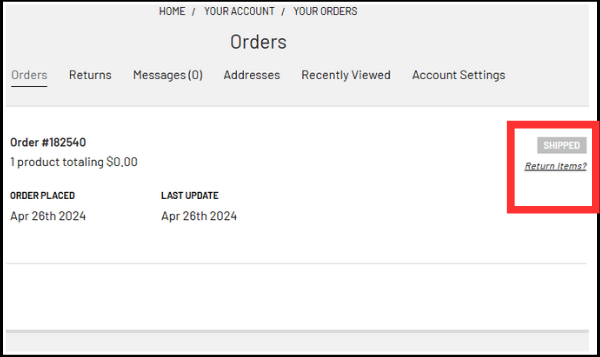
Once you have signed into your account, there will be a section that reads "Return Items?" on the right side of the screen next to the corresponding order. Click it.
On the next screen you will see New Return. Under that there will be the form that you need to fill out in order to initiate a return. Once filled out, click Submit Return Request.
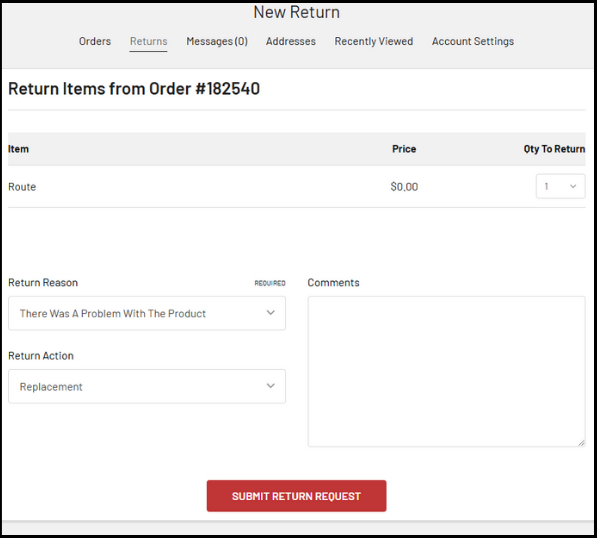
Your request will be sent to Panther RV Products to be reviewed and an RMA will be sent to you along with instructions on what to do to send your product back.

This is the final screen for your return request. The Return Instructions are as follows: Once the return is approved, you will receive a Return Goods Authorization form that will be required for the return. Please package the returning product and RGA form and ship to the provided address on the RGA form.
If you Do Not have an account with Panther RV Products please email: sales@pantherrvproducts.com, with your order number, item(s) you wish to return, and reason for return. Panther RV Products will review your email and send an RMA with details on what to do next.